Did you know that it takes at least 4-6 weeks to see any results from your SEO efforts?
If you want quick results, throw some money at paid advertising. Just remember that it’s a short term gain, and if you want to keep seeing the same spike in website traffic you must continue to pay for it.
SEO is an entirely different beast. It’s more of a long term investment and strategy, but the rewards are much more satisfying and long lasting.
Fortunately, there are a couple of really simple SEO tips and tricks you can start incorporating into your website routine that take hardly any time once you’ve mastered them, and make a tangible difference in getting your site ranked on Google over time. In this article, we’ll be talking about two that you should focus on before your site even goes live.
Include Google Analytics tracking code from Day 1
Before your website goes live, sign up for a Google Analytics account so that you are set up to track your site traffic from Day 1. You’ll need a gmail account in order to do this.
Next, you’ll want to grab the tracking code. You can find this in the Admin tab of Google Analytics, under Tracking Info.
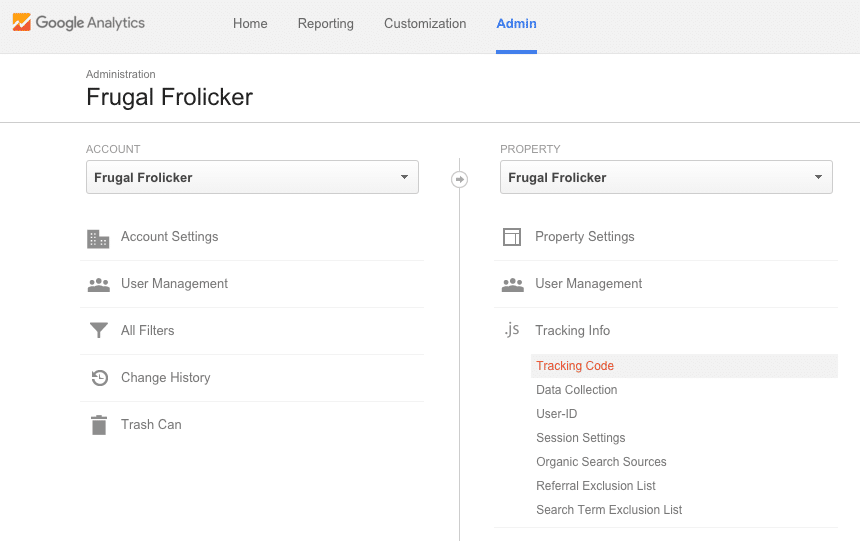
Lastly, you need to embed this tracking code within your website. There are a few ways you can do this: either by manually adding the code to one of your site files (only attempt this if you’re familiar with HTML and PHP!), installing a plugin, or inserting it in your Theme Options (some paid themes will have a box here where you can paste the tracking code).
No matter which option you choose, be sure you’ve done it correctly. The last thing you want is to find out you haven’t been tracking site traffic all along because your Google Analytics tracking code wasn’t embedded properly. If you right-click on your site, select View Page Source, then search for the phrase “google-analytics”, the tracking code should be highlighted in the source code. If this phrase isn’t found, most likely you did not embed your tracking code correctly.
Set up an SEO-friendly permalink structure
A permalink (or permanent link) to a web page is its URL, or the exact web address at which you can reach it. It’s a quick way for Google to ascertain the topic of your website without crawling much further.
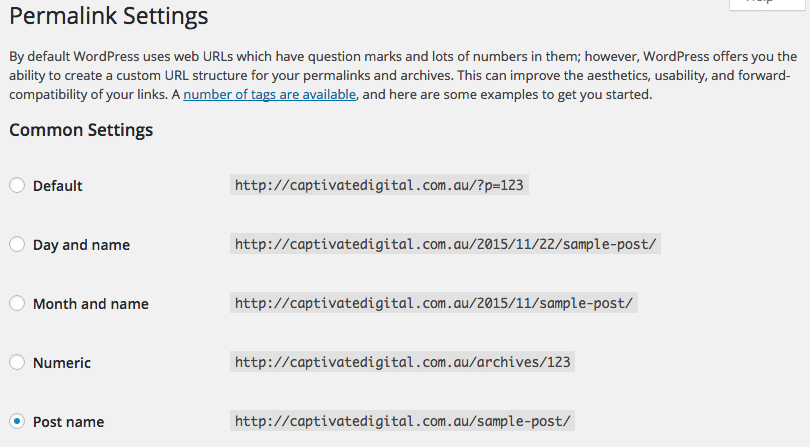
To that end, you want to let Google know what your website is about. The best way to do this is by setting up an SEO-friendly permalink structure. If you’re building a WordPress website, you can configure this from your dashboard under Settings –> Permalinks.
The first few options listed are not very SEO-friendly because those URLs contain extra junk that make Google crawl further to learn more about your website. Avoid using permalinks with numbers, dates, and question marks; instead, opt to include just the page or post name.
Once you have the basic permalink structure set, you can alter the permalink when editing any page or post on your WordPress website. You’ll definitely want to do this when your page or post title is especially long, or else you’ll end up with a massively long URL string. Remove any stop words like “to” or “and”, and aim to include one of your keyword phrases whenever possible.
It’s really important to set your permalink structure early on, otherwise if you want to change it you’ll have to worry about setting up 301 redirects so that your old permalinks redirect to the new ones, and so that your site doesn’t break. Better to get this right from Day 1, set it, and forget it.
Rock Solid Marketing provides SEO services in Australia and worldwide. Contact us to learn more about how to set your website up for SEO success!