In an ideal world, we could just set up a WordPress site and it would magically take care of itself. Wouldn’t that be nice?
The reality, though, is that websites require maintenance. Here are some easy things you should be doing to optimize your WordPress website after the web design stage that will make a big difference in its performance and SEO rankings.
Always update to the latest version of WordPress, plugins, and themes
You know those pesky little notices that pop up on your WordPress dashboard, asking you to update this or that? Stop ignoring them and start heeding their commands!
- First, make sure you’re always up-to-date with the latest version of WordPress.
- Next, update any plugins that need updating. You should always update WordPress first before updating your plugins, in case of compatibility issues.
- Last, update your themes. If you’ve never used and never plan to use any themes that you have installed, delete them. (WordPress comes with a few themes pre-installed that have frequent updates, so it’s best to just delete so you won’t be bothered by them)
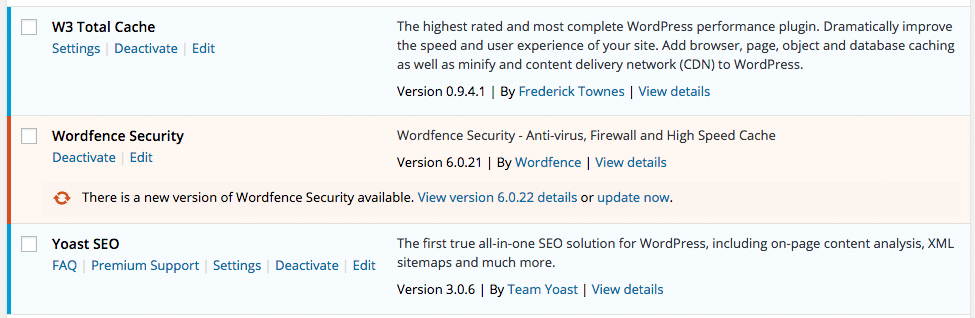
Always update your WordPress plugins!
Clean up your plugins
You should only have plugins installed that are currently active (i.e. are in use on your site) or may be active in the near future. As for the rest: deactivate and delete them. Having too many plugins installed can slow down your WordPress site or potentially cause issues.
Upload images sized for web
Before you upload an image to your WordPress website, make sure you resize it so that it’s smaller than the original file. It’s not uncommon for images to be 10-20 megapixels straight out of your camera, which equates to large file sizes and images sized from 3000 pixels and up on the long edge. You’ll almost never need images this large for your website. Instead, try resizing them to about 1024 pixels on the long edge, or however wide the section on your website is that will contain these images.
Optimizing images on your WordPress site
Optimize images for keywords
There are a couple things you can do to optimize images so that your website shows up on Google for your keyword phrases:
- Save the image file with a name containing your keyword phrase. If the phrase contains more than one word, put a hyphen between them (e.g. keyword “digital marketing agency” would be digital-marketing-agency.jpg in an image filename). Be sure to exclude stop words!
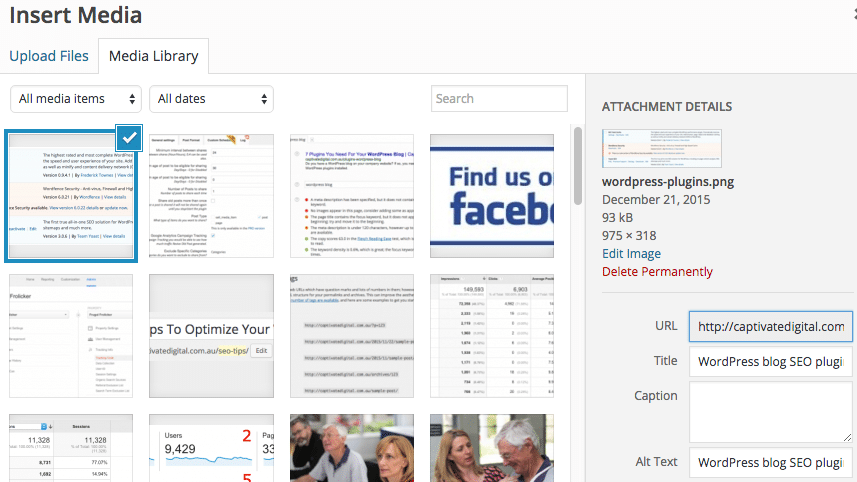
- Use your keyword phrase within the image alt tag. WordPress gives you an option to fill in the box for Alt Tag upon inserting an image. Instead of leaving it blank or with the default filename saved in there, type in your keyword. (e.g. the HTML code for the image should have a component that looks something like: alt=”digital marketing agency”)