Of the hundreds of thousands of WordPress plugins out there, the Yoast SEO plugin is one of the most-downloaded and oft-loved.
Here are a few optimisation tricks our SEO specialists are eager to share with you which can easily be done inside the Yoast SEO WordPress plugin.
De-Index All Taxonomies
Taxonomies in this sense are the various archive pages in WordPress such as categories, tags, authors, and dates. These are all automatically indexed by Google unless you’ve specifically tweaked your website code or the default Yoast settings.
The problem with WordPress taxonomies is that they create several pages of duplicate content, which Google looks down upon and which ultimately impacts your SEO in a negative way. An excerpt of any given page or post on your website may appear on multiple different archive pages. Worse than that, if you have several pages or posts that are categorized and tagged similarly, the entire archive page may contain nearly all of the exact same excerpts for several different categories or tags.
To avoid the duplicate content across taxonomies issue, you should choose not to index your archives. Here’s what to do using the Yoast SEO plugin, under Titles & Metas:
- Click on the Taxonomies tag. Select ‘noindex’ for categories and tags. (You could probably do this for all other items on the page as well)
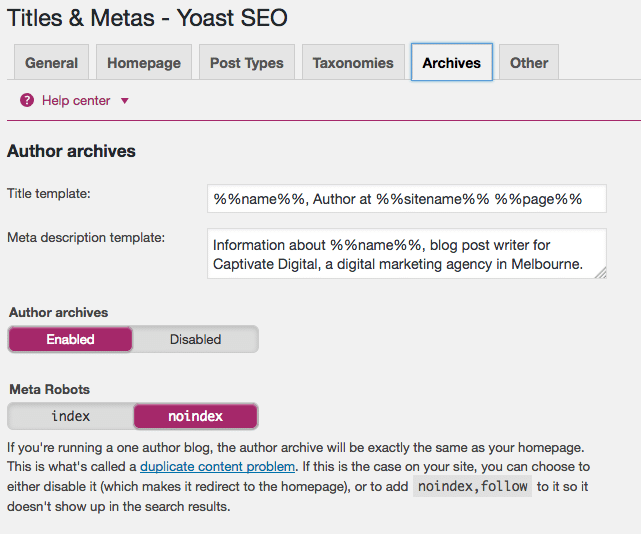
- Click on the Archives tab and select ‘noindex’ for author and date archives.
- Click on the Other tab and select ‘noindex’ for archive subpages.
With Yoast, you can optimise each individual page and post’s title tag inside the page or post itself. But did you know you can tweak the format of title tags and optimise them across your entire site?
The SEO specialists at Rock Solid Marketing recommend adding “{company name} – {keyword}” to the end of every page title. The keyword here should be the keyword you would most like to rank highly for, and ideally it should concisely describe exactly what your site or business is about. Make sure to keep it short though, as too-long title tags will get cut off when Google displays search results.
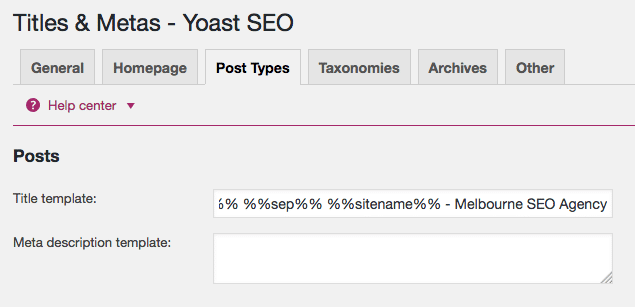
Note that your company name will probably be the same as your site name already, in which case you can use the %%sitename%% variable in title tags. (If it’s not, then remove the variable and manually type in your company name).
Edit Pages and Posts in Bulk
If you’re doing an SEO cleanup on your site by optimising all of your page titles and meta descriptions, you can save yourself heaps of time by editing them in bulk rather than opening up each individual page and post.
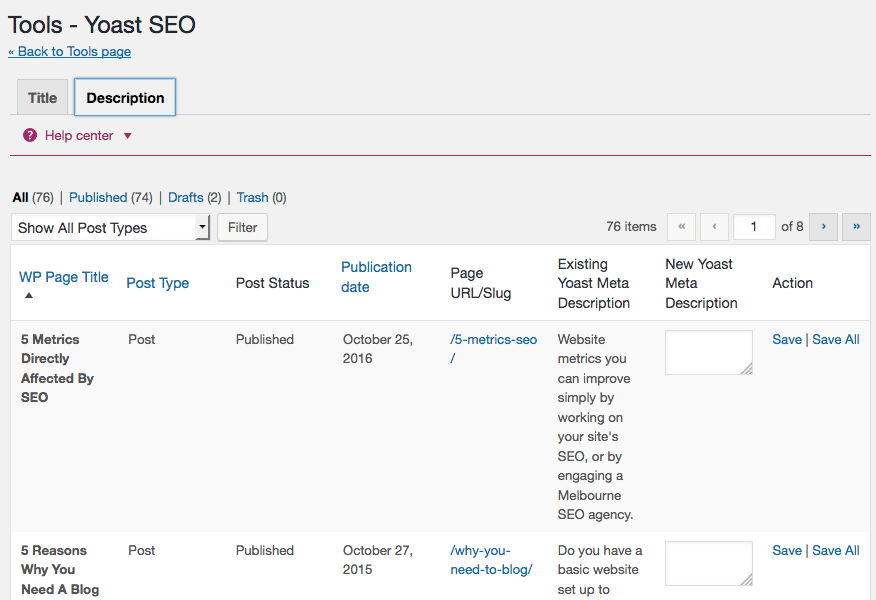
With Yoast SEO, all you have to do is click on Tools, then either the Title or Description tab depending on which you’d like to work on. Below it, your pages and posts will load with their existing title or description, and space next to it where you can write in a new and optimised one.
Rock Solid Marketing is an SEO agency in Melbourne & Mildura. Contact us to learn more about how to set your website up for SEO success with our SEO services!